Documentation Library
A primary goal of the platform is to provide a centralised repository for all API specifications. This allows organisations to manage their API documentation in a structured and consistent manner, ensuring that all stakeholders have access to the most up-to-date information.
To make this easy to use, we have designed a simple hierarchy of Issuers, Documents and Specifications, with an additional governance layer called Repositories.
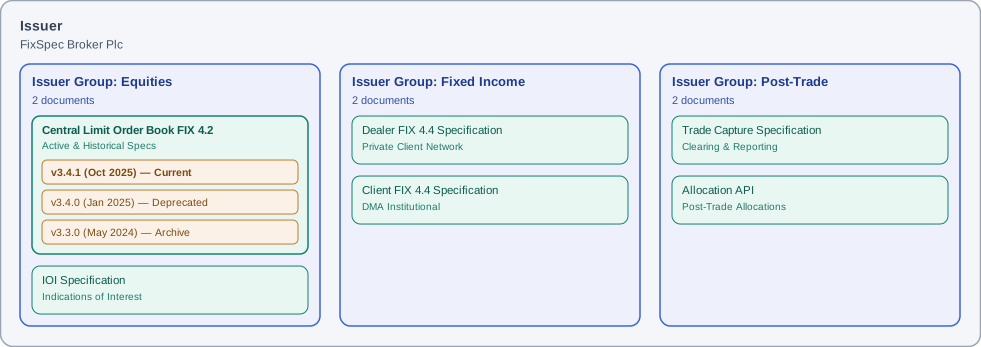
Issuers, Groups & Documents
An Issuer is a logical entity that is responsible for creating and managing API specifications.
If you are a small organisation, then you will likely have a single Issuer - your firm itself. If, however, you are a larger organisation with multiple different services or divisions (possibly operating under different sub-brands), then you may model this using multiple Issuers.
Within each Issuer, you may group API specifications into Issuer Groups as required. A good way to think of this, is as simply tabs on a page; indeed, that is how they appear visually.
Within an Issuer Group, you will place your individual Documents (titles) which - of course - are versioned over time. A version of a Document is what we refer to as a Specification.
Here’s how this hierarchy might look in practice:
Repositories
Documents that you author may have a Protocol (e.g. FIX, REST or SBE) associated with them. If it does, then the messages, fields and enumerations will automatically be grouped into a Repository for that Protocol.
ℹ️ Non-Protocol documents
The word “may” is important here. Purely informational documents are perfectly possible, of course, and in this case they will not have a Protocol and will not form part of a Repository.
Here is how the same library of documents in the figure above may be viewed through the lens of Repositories:
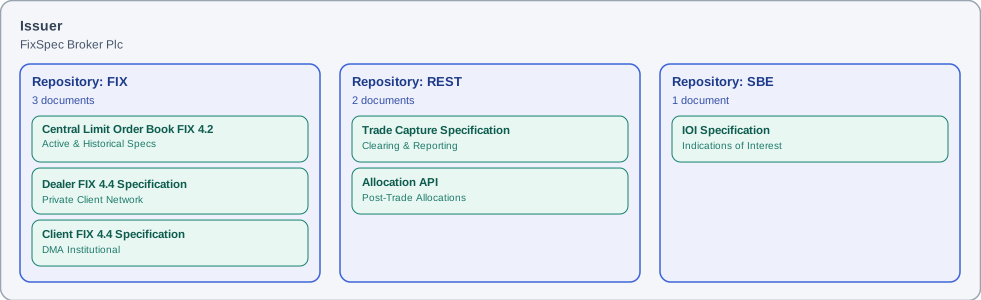
So now we know the definition of a Repository, what do they do? Simply put, they are a governance layer which groups together all messages, fields and enumerations for a given Issuer and Protocol for easy comparison. This view allows easy curation of:
- Which messages are used across various specifications, and how they are described.
- A superset of all fields used across all documents, including the ability to centrally define fields (therefore driving standardisation).
- The superset of enumerations across all instances, offering standardisation opportunities.
Specification Versioning
Our research into the key pain points of API document recipients (i.e. your customers) has shown that versioning is critical for maintaining clarity and consistency. You may also have felt the frustration of inconsistency, or of somebody sending out the “wrong” version by mistake.
Part of the solution here is to remove local copies from individual computers (I’m looking at you Microsoft Word), and centralise them within a shared platform. But also, the platform needs to encourage good version hygiene, which is why we enforce a variation of semantic versioning which we have adjusted for documentation.
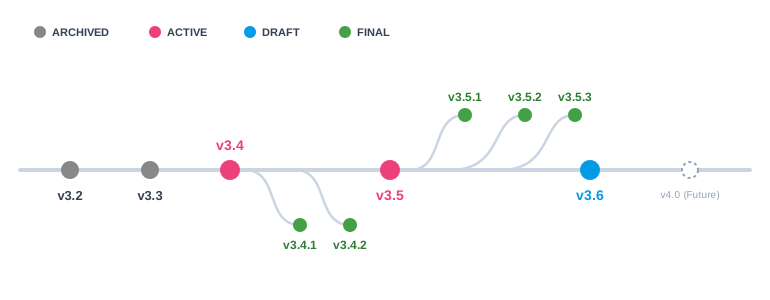
The idea is that documents pass through a series of states, each with a distinct purpose, and that the versioning scheme reflects this.
| State | Editable | Format | Purpose |
|---|---|---|---|
| DRAFT | ✓ | X.Y | The starting state for all new spec versions. A work-in-progress document which is undergoing frequent change, is not yet ready for distribution or use in conformance. |
| ACTIVE | ✓ | X.Y | A version which has matured/stabilised to the point where it should be used for conformance. Edits are still possible. |
| FINAL | ✗ | X.Y.Z | A (frozen) snapshot of a document which is for distribution to customers or published to an online portal. |
| ARCHIVED | ✗ | - | A document which should no longer be used, but is kept for ease of reference. |
💡 Versioning Is Here To Help
Versioning can feel restrictive at first - “Do I really need a new version just for a minor typo?” is a fair question. It’s easy to slip back into old habits: editing an ACTIVE version directly, exporting it to PDF, and emailing it to a customer.
That’s still technically possible, but we enforce this discipline for a reason - it’s what lets your customers connect to your platform faster, with fewer version mix-ups along the way.
Fieldsets: Messages, Components & Views
Within the platform, we often use the term Fieldset to refer to a structured collection of fields. A Fieldset can take one of three different forms:
- Component - A collection of fields that is defined once and re-used by reference elsewhere in the spec. Examples include Standard FIX Header or Instrument groups.
- Message - A classic FIX message or REST payload, which is exchanged between the two parties. In FIX, this might be a New Order Single (D) message.
- (Functional) View - A variation (subset) of a Message within a specific business context. For example, we may refine an Execution Report (8) message into Fill versus Acknowledgement, or model a New Order Single (D) by order type.
💡 Functional Views Are Worth The Effort
Coming from PDF-based specifications? You probably aren’t writing functional views today, and at first they may feel like an overhead. They are, however, a genuinely effective way of describing your API, letting you refine the contents to help customers understand your functionality far more clearly (and when it comes to AI consumption, they are a must).
Remember: whenever you find yourself talking about a “fill” instead of an Execution Report, or a “market order” instead of a New Order Single, then you are talking about a functional view.